


How PaperLess Automatic PO Matching Works
PaperLess Purchase Order Matching automates the matching and closing of purchase orders in Sage 50 Accounts, Sage 50cloud, Sage 200 Professional, Sage Intacct, Xero, and SAP B1.
With the seamless integration of PaperLess Document Management and your accounting software, accounts teams can effortlessly match and close purchase orders, speeding up invoice processing and improving accuracy.
PaperLess Automatic Purchase Order Matching eliminates the need for manual checks. The software automatically captures invoice data and, when a purchase order number is found, compares the invoice amount to the purchase order amount. If they match, the purchase order is closed, and the transaction is posted automatically.
In addition, PaperLess enables automation of the entire purchase order approval process through PaperLess PO Requisition, covering all steps before the purchase order is created in your accounting system. Click here to learn more about PO Requisition Software for Sage.
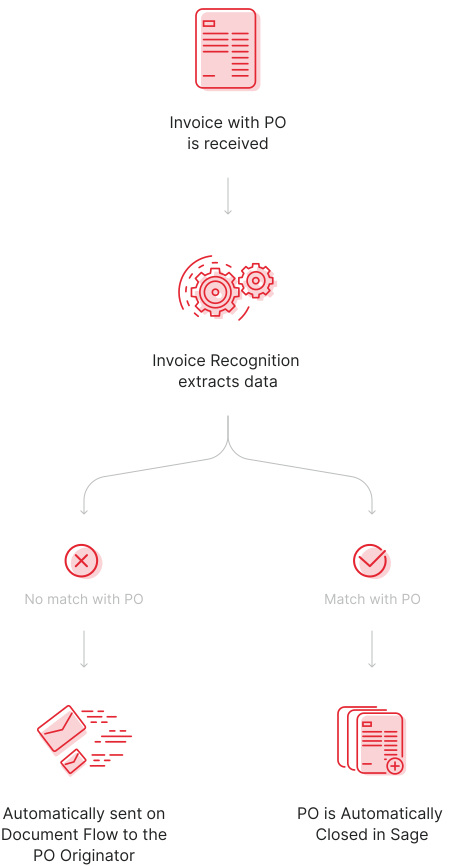
Once you bring the invoices into PaperLess, all you need to do is run PaperLess Automatic Invoice Recognition to extract all data from the invoices automatically. When the OCR detects a Purchase Order number on the invoice, PaperLess checks if there is a corresponding Purchase Order in Sage, Xero or SAP Business One for that supplier matching the number on the invoice. If a match is found, PaperLess automatically verifies whether the amount on the invoice matches the amount on the Purchase Order. If they match, PaperLess posts the invoice and automatically closes the Purchase Order.
Yes, with PaperLess Company Inbox, Accounts Teams can automate this process even further. All they need to do is set up PaperLess to automatically process all invoices received via email and, when capturing data from the invoices, check if a purchase order (PO) number is present to verify whether the PO and invoice amounts match.
If there is a match, Accounts Teams can configure PaperLess to automatically post the transaction and close the purchase order in Sage, Xero, or SAP B1.
By implementing such automation rules, Accounts Teams can have all invoices that match the purchase orders in Sage, Xero or SAP processed automatically, eliminating the need to review those invoices. This allows Accounts Teams to focus solely on invoices that do not match the purchase orders.
It took a while before I got used to the idea of a PaperLess accounting, but I would not want to go back.

Bram Boone, Chief Financial Officer
The level of automation and visibility we now have was exactly what our finance function needed.

Finance Team
Learn About Other Features

We use cookies on our website to give you the most relevant experience by remembering your preferences and repeat visits. If you click on "Accept All", you consent to the use of ALL the cookies.
Please click on "Customize" to provide a controlled consent and view details of each cookie and to provide specific consent.
We use cookies to help you navigate efficiently and perform certain functions. You will find detailed information about all cookies under each consent category below. The cookies that are categorized as "Necessary" are stored on your browser as they are essential for enabling the basic functionalities of the site. We also use third-party cookies that help us analyze how you use this website, store your preferences, and provide the content and advertisements that are relevant to you. These cookies will only be stored in your browser with your prior consent.
You can choose to opt-out of these cookies. But opting out of some of these cookies may have an effect on your browsing experience as per the descriptions to be found within the respective categories below.
Necessary cookies are required to enable the basic features of this site, such as providing secure log-in or adjusting your consent preferences. These cookies do not store any personally identifiable data.
Cookie: PHPSESSID
Duration: Session
Description: This cookie is native to PHP applications. The cookie is used to store and identify a users' unique session ID for the purpose of managing user session on the website. The cookie is a session cookies and is deleted when all the browser windows are closed.
Cookie: rc::a
Duration: Never Expires
Description: This cookie is set by the Google recaptcha service to identify bots to protect the website against malicious spam attacks.
Cookie: rc::c
Duration: Session
Description: This cookie is set by the Google recaptcha service to identify bots to protect the website against malicious spam attacks.
Cookie: __cf_bm
Duration: 1 hour
Description: This cookie, set by Cloudflare, is used to support Cloudflare Bot Management.
Functional cookies help perform certain functionalities like sharing the content of the website on social media platforms, collecting feedback, and other third-party features.
Cookie: wp-wpml_current_language
Duration: Session
Description: WordPress multilingual plugin sets this cookie to store the current language/language settings.
Analytical cookies are used to understand how visitors interact with the website. These cookies help provide information on metrics such as the number of visitors, bounce rate, traffic source, etc.
Cookie: _ga
Duration: 2 years
Description: Used by Google to distinguish users and sessions. The cookie is created when the JavaScript library executes and no existing _ga cookie exists. The cookie is updated every time data is sent to Google Analytics.
Cookie: _gid
Duration: 1 day
Description: Used to distinguish users. Google uses this cookie to throttle the request rate.
Cookie: gat
Duration: 1 minute
Description: Used to throttle request rate.
Advertisement cookies are used to provide visitors with customized advertisements based on the pages you visited previously and to analyze the effectiveness of the ad campaigns.
Cookie: _gcl_au
Duration: 3 months
Description: Used by Google Ads to understand user interactions with the website to measure ad effectiveness and conversions.
Cookie: _gcl_aw
Duration: Session
Description: Used by Google to store information about how visitors use a website and to help create an analytics report on the website's activity.
Cookie: gac
Duration: Session
Description: Used by Google to store information about how visitors use a website and to help create an analytics report on the website's activity.
Cookie: _gid
Duration: Session
Description: Used by Google to distinguish users. Google uses this cookie to throttle the request rate.
Cookie: gat
Duration: 1 minute
Description: Used by Google to throttle request rate.
Cookie: MUID
Duration: 1 year
Description: Identifies unique web browsers visiting Microsoft sites. It helps with advertising, site analytics, and other operational purposes.
Cookie: ANID
Duration: 1 year
Description: Used for advertising purposes and helps in tracking conversions and user behavior across Microsoft services.
Cookie: GUID
Duration: 1 year
Description: Synchronizes the MUID across Microsoft domains.
Cookie: SM
Duration: Session
Description: Helps in synchronizing the MUID across Microsoft domains.
Cookie: __oppref
Duration: 30 days
Description: Set by the OpenAI Ads Measurement Pixel to store the reference identifier of a ChatGPT advert you clicked, so that later actions on our website can be attributed to that advert.
Cookie: __obref
Duration: 1 year
Description: Set by the OpenAI Ads Measurement Pixel to store a randomly generated browser reference, used to measure the effectiveness of our ChatGPT advertising.


