


By Diogo Cavazzini, Product & Marketing Director, PaperLess Europe
Helping finance teams across Sage, Xero and SAP Business One automate invoice processing and expenses
Supplier invoices get most of the attention in accounts payable. Employee expenses get very little, until the last days of the month, when a pile of receipts and claims arrives and the close has to wait for it.
When I speak to CFOs and Finance Directors about expenses, the complaint is rarely the money itself. It is the lack of visibility. Spend has already happened, the receipt is in a pocket or a photo gallery, and finance finds out what was spent only when the claim lands. By then there is little left to control.
Why expenses are a control problem, not an admin problem
A supplier invoice at least arrives with a purchase order or a contract behind it. An expense often has nothing: a card payment, a train ticket, a client lunch. The only evidence is a receipt, and receipts are easily lost, photographed badly or submitted weeks late.
That creates three familiar problems. Claims arrive in bulk at month end, so the close depends on people outside the finance team. Coding is inconsistent, because the person submitting the claim is guessing the right account. And policy is checked after the money has gone, which is the least useful moment to discover a breach.
None of these is a people problem. They are the natural result of a process that starts with paper and ends in a spreadsheet.
The shift: bringing control to the moment of spend
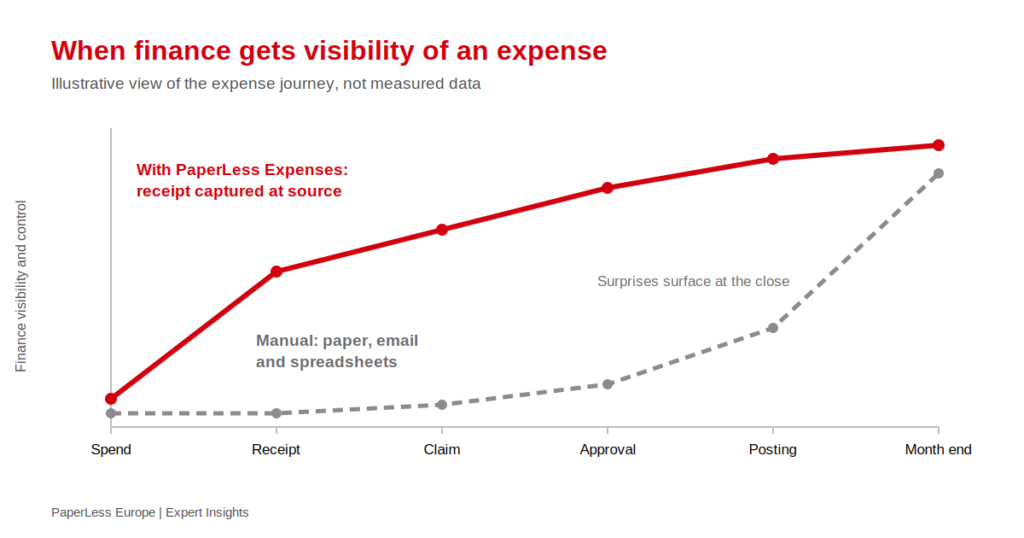
The graph below shows the idea. In a manual process, finance has very little visibility until the claim is processed, and most of the surprises surface at the close. When the receipt is captured at source, visibility starts early and keeps rising as the expense moves through approval and posting.
What this looks like with PaperLess Expenses
With PaperLess Expenses, employees capture a receipt with the mobile app, or upload it through the web, as soon as the expense happens. The data on the receipt, such as the date and amount, is extracted automatically, and the receipts are built into expense claims, either one receipt at a time or as a single monthly claim.
Approvers see the whole claim
Approvers can act on a single receipt or an entire claim, from the web or from their phone, with a preview of every receipt included. Predefined approval hierarchies and a second approval level mean the right person signs off, and the whole process leaves an auditable trail instead of an email thread.
Mileage handled in the same place
Employees submit mileage and attach fuel receipts, and the system calculates the cost from the standard and discounted rates your company sets. That removes a spreadsheet that most finance teams would happily retire.
Posted to the accounting system, correctly coded
Once approved, the expense is posted to the accounting system with account and tax codes read from that system, which reduces miscoding. Finance staff can also look up receipts and claims from inside the accounting software, rather than asking for a copy.
PaperLess Expenses is designed to connect with Sage 50, Sage 200, Sage Intacct, Xero, SAP Business One and Orderwise. If you run a specific version, confirm the exact posting and look-up options in a demo.
What a CFO should ask before changing the process
- Where does control happen today: at spend, at approval, or only at the close?
- How many claims reach finance in the last week of the month?
- Who decides the account and tax code, and how often is it corrected?
- Can you prove, quickly, who approved a claim and when?
If the honest answers are uncomfortable, the issue is the process, not the people submitting claims.
Part of the same finance workflow
Expenses work best when they sit alongside the rest of accounts payable. The same approval discipline applies to supplier invoices through PaperLess Invoice Approval, and invoices from every source still arrive in one place through the Company Inbox. If you work with Sage Intacct, see how CFOs are automating accounts payable in Sage Intacct. You can also put numbers against your own invoice volumes with our AP automation savings calculator.
For the product detail, our guide on automated expense management on AccountingWEB covers the full workflow. PaperLess is available through the Sage Marketplace and the Xero App Store, and you can read independent feedback on Trustpilot.
See it with your own expense process
The best test is a real claim. Book a free demo and bring a few receipts, your mileage rates and your approval rules. We will show you how they would be captured, approved and posted. You can also see how other finance teams have approached it in our customer case studies.
