


 The challenge of automating invoice scanning processes is not so much related to automatically scan and capture data from invoices but what to do with that data.
This is where the true key for automating invoice scanning and invoice processing routines lies. Finance Professionals need to know what to do with the data captured by their OCR engine. For Sage users across UK and Ireland the preferred solution is Sage Approved PaperLess Invoice Scanning Software.
As Sage Certified Software, PaperLess knows exactly what to do with the data captured by PaperLess OCR Software for Sage. This makes it possible to automatically scan, capture and post invoice data to Sage at the click of a button.
With PaperLess Invoice Capture all invoice data is automatically retrieved and posted into Sage without having manually import files. This makes invoice processing a much faster and accurate process than ever before.
PaperLess Invoice Scanning Software is a Sage Developer Partner Solution fully compatible with Sage 50cloud, Sage 200cloud Professional, Sage 200cloud Standard and Sage 200 Extra Online.
How to Scan Invoices with Sage – Click to Learn More


So, how does automatic invoice scanning software for Sage work?
Seamless integrated with Sage, PaperLess Invoice Scanning Software scans invoices as soon as there are received.
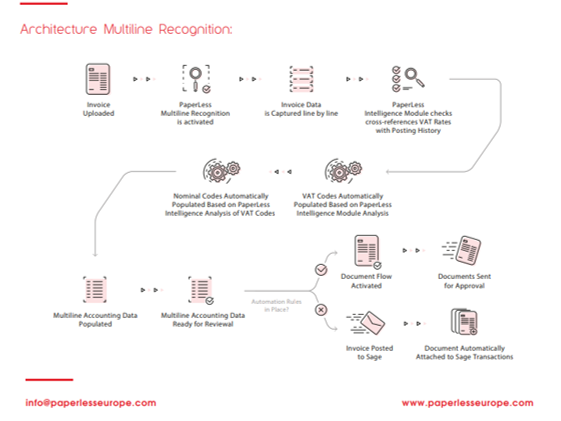
Once the scanning process finishes, PaperLess users can apply the different Journal Types and simply run PaperLess Invoice Recognition to automatically extract all relevant data from the invoices. Once the data is captured it can be reviewed or sent for approval to the relevant people within the company with PaperLess Online Invoice Approval.
After data is reviewed all users need to do is to post the transactions into Sage directly from PaperLess. Something only possible because PaperLess works together with Sage so that invoice processing can become a fully automatic process.
What is PaperLess OCR Software for Sage?
Optical Character Recognition (OCR Software) technology enables companies to process their documents and especially invoices in an automated manner. With PaperLess OCR, Finance Departments using Sage are now able to process a much higher number of invoices without increasing the accounts headcount.
With this OCR Software fully compatible with Sage no more time needs to be spent on manual inputting invoice data into Sage. PaperLess capture all relevant accounting data from invoice amount and date, to supplier and invoice description lines.
The seamless integration with Sage also makes it possible for PaperLess to automatically populate the default tax and nominal codes. This way Sage users do not have to spend any time on manually keying in those details.
Then, all that is left is to review the accounting data populated by PaperLess Software and post it to Sage.
PaperLess Invoice Scanning for Sage – Where are the invoices scanned to?
Many Sage users wonder what happens to the invoices once they are scanned and the transaction is posted to Sage. Well, invoices are also automatically attached to Sage in a fully automatic process.
With PaperLess Invoice Scanning Software the entire invoice scanning process is done in a fully automatic manner. Invoices get scanned, data is captured and when posted to Sage invoices are automatically attached to Sage transactions.
PaperLess Invoice Scanning for Sage turn invoice filing into a fully automatic process so that you do not have to spend any more time on archiving invoices.

